#gamedesign
#userresearch
#usabilitytest

1
Initial Questionnaire
What is your age Up to 18 years old ( ) Between 18 and 23 years old ( ) Between 24 and 33 years old ( ) Between 34 and 43 years old ( ) Between 44 and 53 years old ( ) Over 54 years old ( ) Do you own any of these devices? Desktop Computer/Laptop ( ) Tablet ( ) Mobile Phone ( ) None ( ) On average, how much time per day do you use these devices? Less than 1 hour ( ) Between 1 to 5 hours ( ) Between 6 to 10 hours ( ) More than 10 hours ( ) Which of these apps do you use frequently? Facebook ( ) Whatsapp ( ) Youtube ( ) Twitter ( ) Email ( ) Instagram ( ) TikTok ( ) Others Do you use or have you ever used an educational app or tool for children? If so, which ones? How was your experience? Do you use or have you ever used a game to stimulate children's learning? If so, which ones? How was your experience?
2
Tasks for the Usability Test
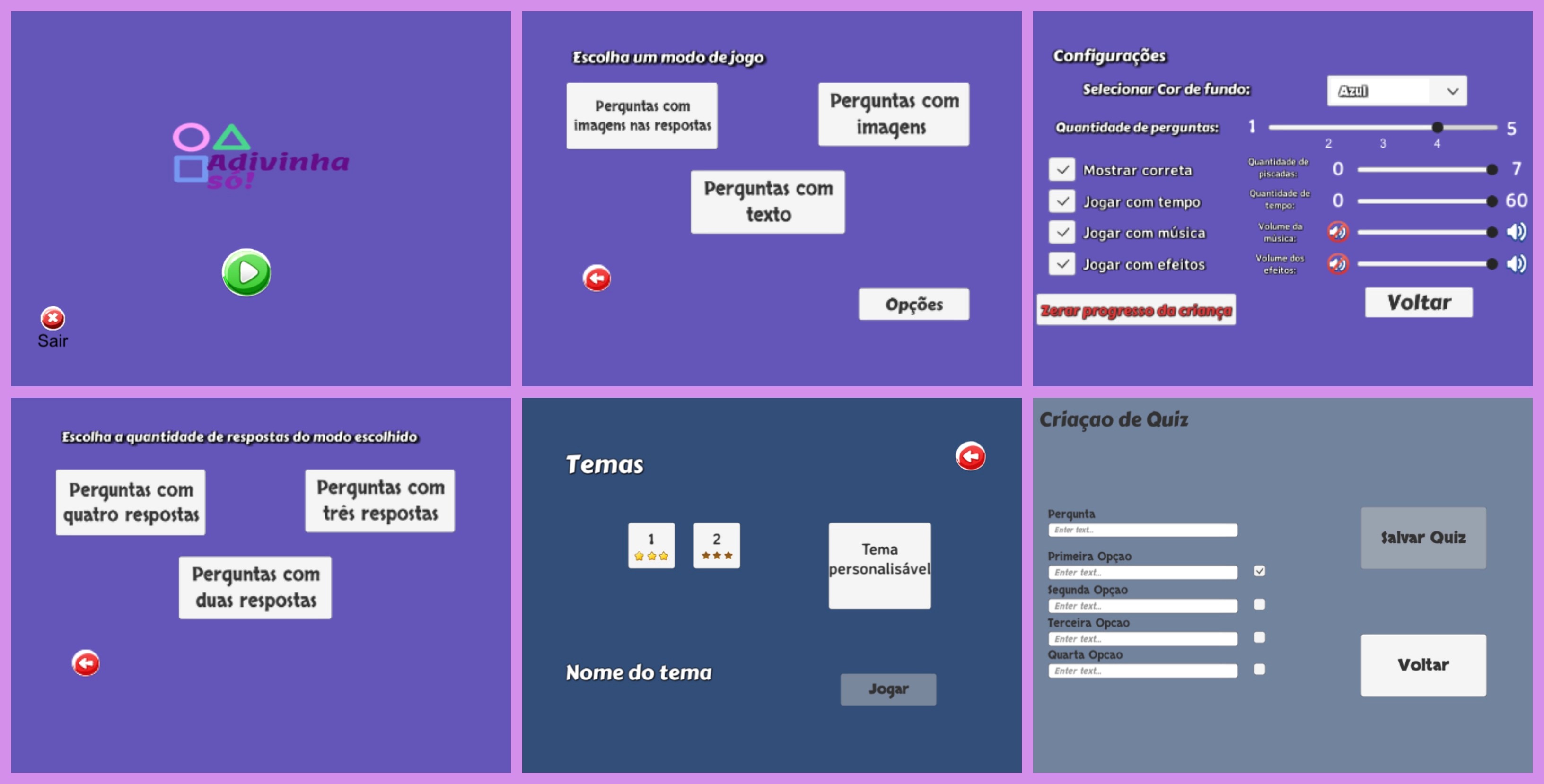
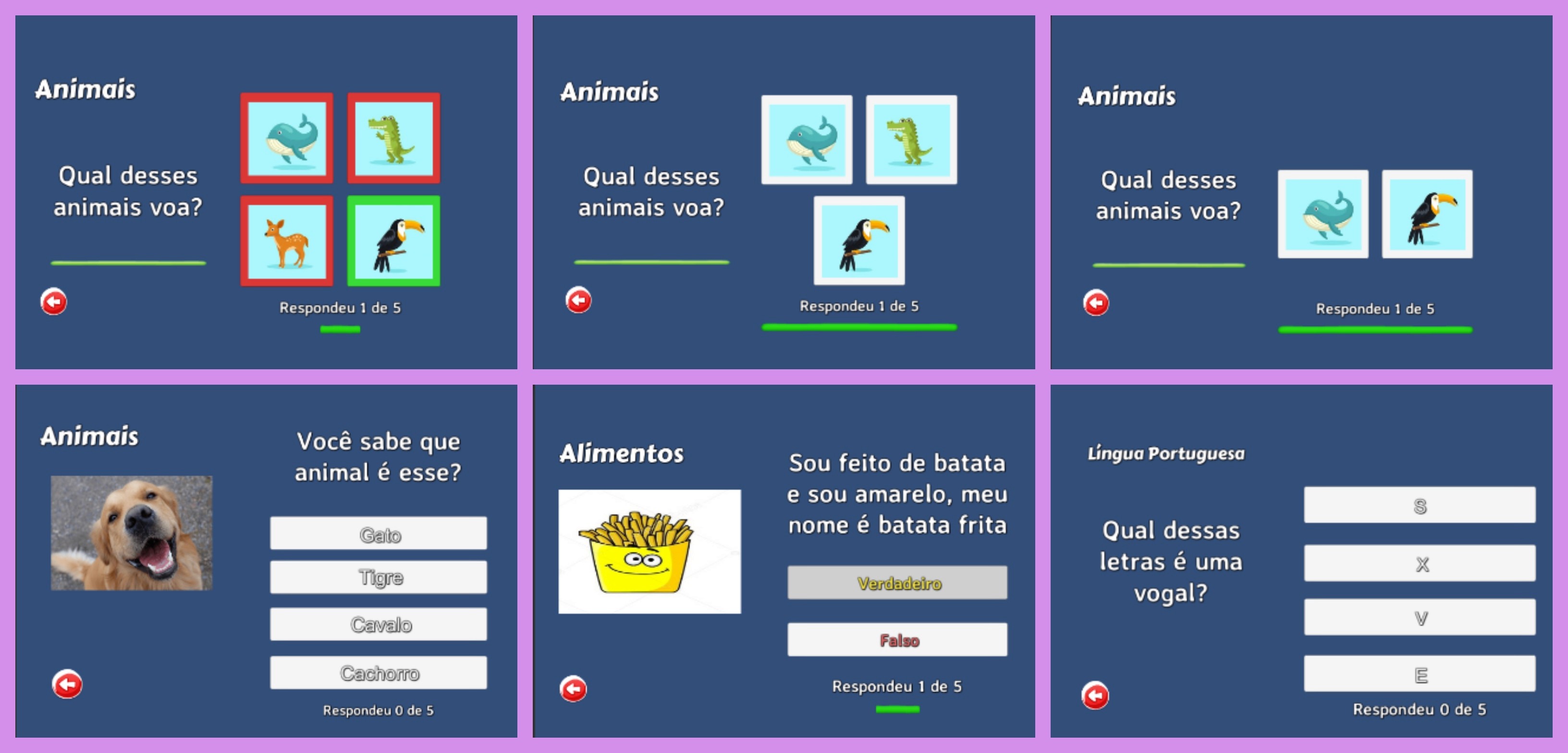
Task 1: Choose the game mode with images in the answers and play until the end (with the options: Black Background Color, Play with time, and show correct alternative). Task 2: Choose the game mode with images in the questions and play until the end (with the options: Blue Background Color, Play with time deactivated, and show correct alternative deactivated). Task 3: Choose the text-only game mode and play until the end (with the options: Green Background Color, show correct alternative activated, play without sound effects deactivated). Task 4: Make the desired settings and play a theme with 3 image answers. Task 5: Create a custom theme and play.
3
Final Questionnaire
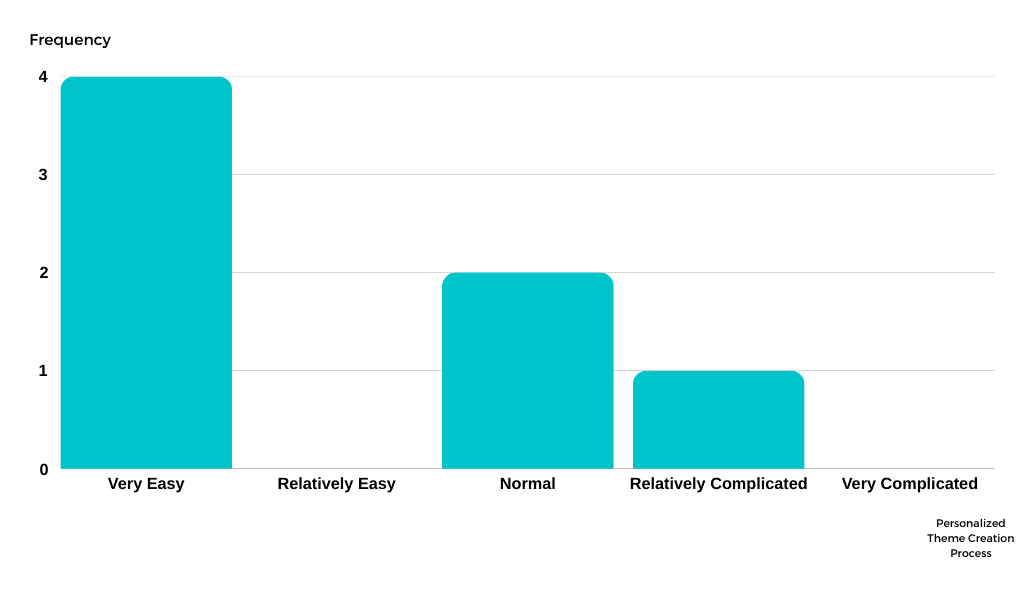
How was your experience using the application? Feel free to comment on your experience. Terrible ( ) Bad ( ) Fair ( ) Good ( ) Excellent ( ) What was the difficulty level of creating a custom theme? Very easy ( ) Relatively easy ( ) Normal ( ) Relatively complicated ( ) Very complicated ( ) Considering its use by children with disabilities, the current customization options are: Insufficient ( ) Bad ( ) Fair ( ) Good ( ) Excellent ( ) Considering its use by professionals like therapists, the visual aspect of the menus and game configuration is: Insufficient ( ) Bad ( ) Fair ( ) Good ( ) Excellent ( ) Among the tasks performed, please rate them by difficulty from 1 to 5, where 1 is the easiest task and 5 is the most difficult. Feel free to comment on your rating. Task 1 ( ) Task 2 ( ) Task 3 ( ) Task 4 ( ) Task 5 ( ) Please point out (at least) two negative aspects of the game. Please point out (at least) two positive aspects of the game. Can you suggest any additional features for the game? Do you have any additional comments? Feel free to comment on anything you'd like.
4
Final Questionnaire
What is your profession? How long have you been working in your profession? Less than 1 year ( ) Between 1 and 3 years ( ) Between 4 and 6 years ( ) More than 6 years ( ) Have you used the app "Adivinha Só" with children who have some type of physical or cognitive limitation? If so, with how many children did you use it? Yes ( ) No ( ) Do you have suggestions for themes and/or game modes for the application? Do you believe the application can assist in the treatment of patients with cognitive limitations? Please justify your answer. What features do you think differentiate "Adivinha Só" from other educational apps for children that you have used? Considering its use by professionals, rate the following aspects of the game: Ease of Use (1) Very difficult (2) Difficult (3) Normal (4) Easy (5) Very easy Visual aspect of the menus (1) Very Bad (2) Bad (3) Fair (4) Good (5) Very Good Theme display (1) Very Bad (2) Bad (3) Fair (4) Good (5) Very Good Size of letters and images (1) Very Bad (2) Bad (3) Fair (4) Good (5) Very Good Considering the gameplay for children with limited cognitive or physical abilities, rate the following statements according to your level of agreement: The visual elements on the game screen minimize possible distractions for the child. Completely disagree || Partially disagree || Indifferent || Partially agree || Completely agree I intend to include the application in my sessions with children. Completely disagree || Partially disagree || Indifferent || Partially agree || Completely agree The difficulty level of the played themes is good, and they can be applied in daily routines without difficulty. Completely disagree || Partially disagree || Indifferent || Partially agree || Completely agree Do you believe an important feature should be implemented? If so, what? Do you have any additional suggestions or comments? Feel free to comment on anything you'd like.
Results
During the tests, participants explored different areas of the platform and shared their impressions of the experience. Overall, the use was intuitive, and the navigation flow made sense to most.
1
What worked well
- Ease in finding important information. - Clear interface structure. - The experience was considered positive and simple to understand.
2
Points of attention
- Some users had difficulties in more specific steps. - Small adjustments to navigation and clarity of terms could further improve usability.
3
Main learnings
- The experience was well-received, confirming that the design is on the right track. - Real user feedback provided insights to refine details and make the journey even more fluid.
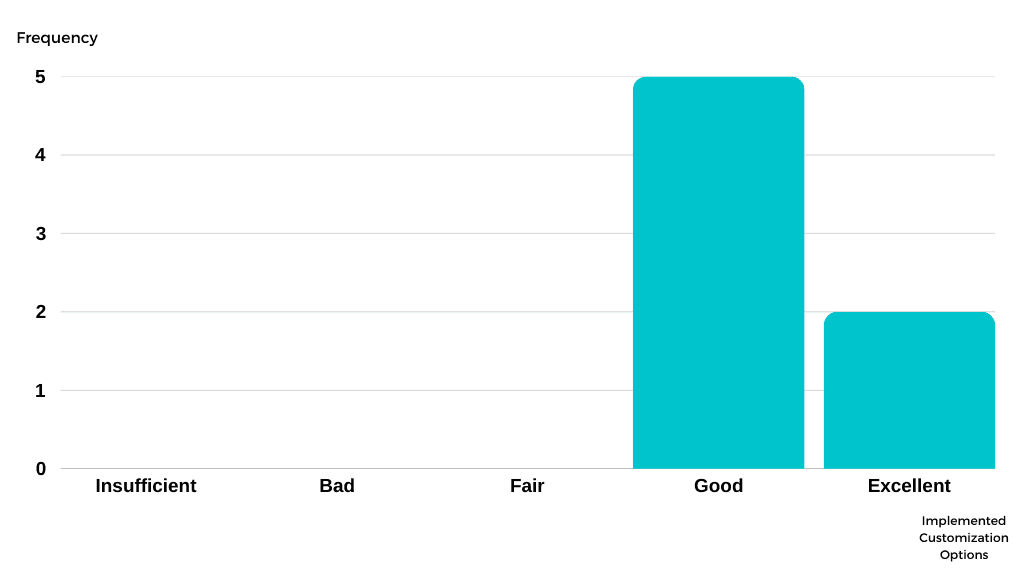
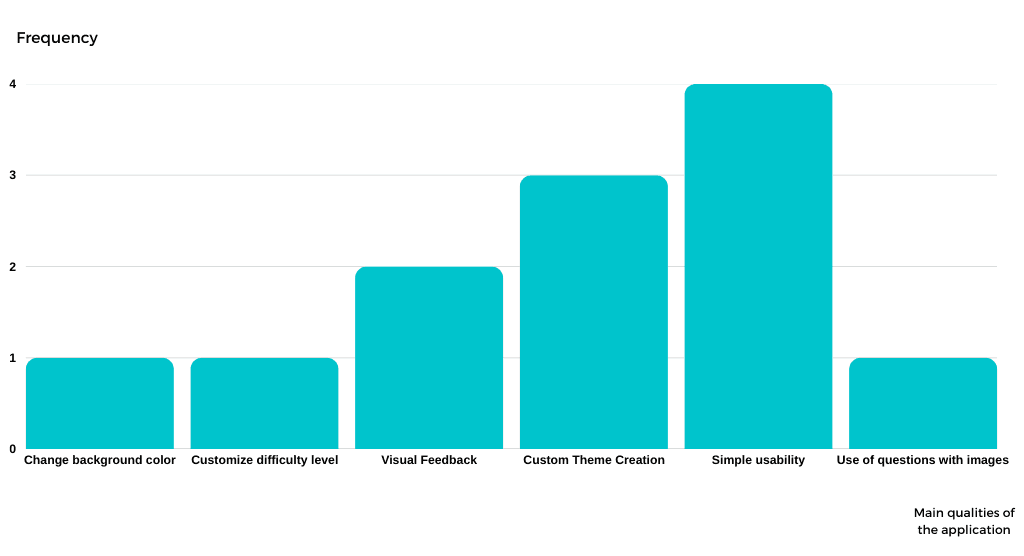
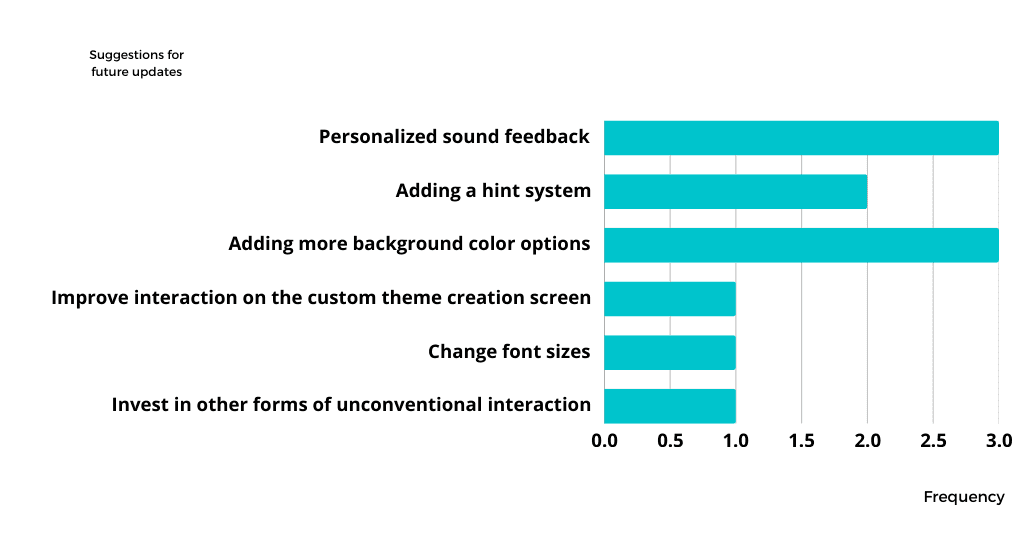
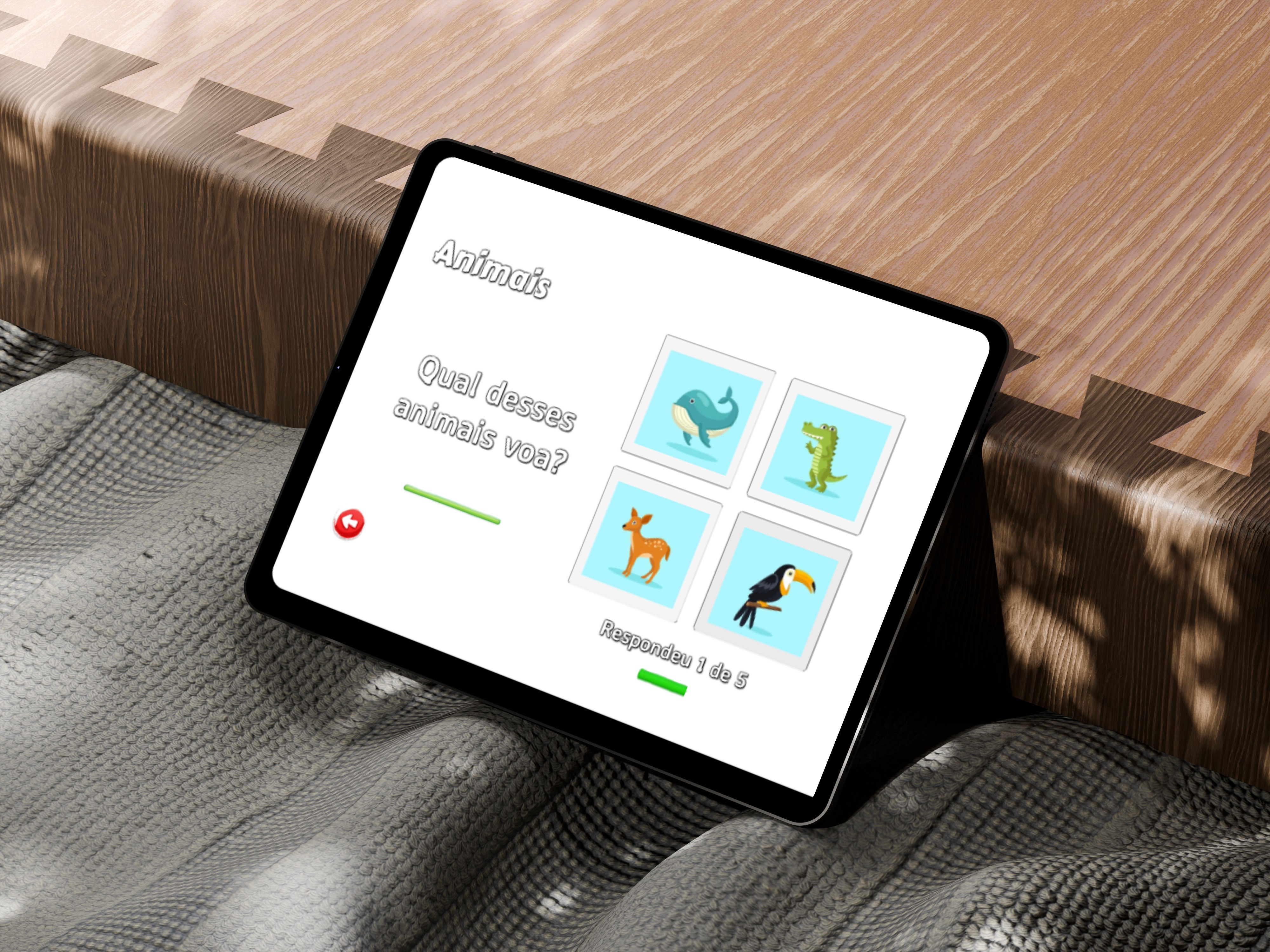
The "Adivinha Só" project is an adaptive game tool meticulously developed to assist professionals who work with children with disabilities, aiming to improve their cognitive and motor skills. The work involved in-depth research and testing with specialists, allowing for the consolidation of results and product validation. The application received positive feedback, especially regarding its customization features, which enable specialists to create custom themes to meet the specific needs of each child. For future steps, the project plans to expand its functionalities, including the implementation of a multiplayer mode and personalized audio. This project demonstrates the ability to translate the theory of interaction design and assistive technology into a practical and inclusive solution, with great potential for growth and social impact.
Figma
C#
Unity